



- 1. Check for Broken Links
- 2. Review Your Header Hierarchy (Yes, It Matters)
- 3. Refresh Your Page Titles and Meta Descriptions
- 4. Audit Your Website Speed
- 5. Test Mobile Friendliness
- 6. Check Google Search Console + Analytics
- 7. Audit Your Website’s Backlinks
- 8. Review Navigation + Design Consistency
- 9. Audit Your Website for Accessibility
- 10. Review Your Copy
- ✅ Your Quick Website Audit Checklist
- Wrap-Up + Next Steps
- Frequently Asked Questions
There’s something about the new year that makes everyone want to clean house — closets, calendars, inboxes, all of it. So why not audit your website too? It deserves the same level of TLC.
Your website is basically your online storefront, your portfolio, and your first impression all rolled into one. And if it’s outdated, broken, or just meh, you’re not setting yourself up for a strong start this year.
So before you start tweaking your offers or rolling out new launches, take an hour (or two, tops) to run through this quick website audit checklist. It’s easy, it’s free, and it’ll help you make sure your site is performing, converting, and actually working for you so you can start the new year with confidence and all your ducks in a row.
And if you’d rather have someone poke around and tell you exactly what’s working, what’s not, and what’s missing, you can grab a free discovery call. We’ll do a mini audit together, and you’ll walk away with a clear list of what to fix or improve this year.
1. Check for Broken Links
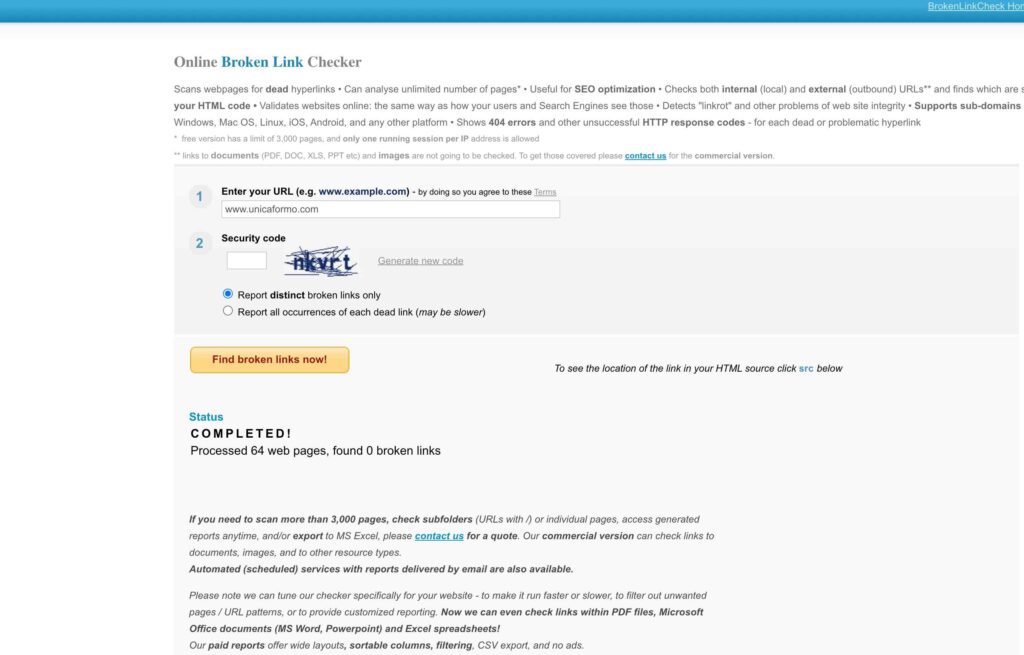
You don’t want to start the year with broken links on your website — it’s one of the easiest things to check and fix, so no excuses. Broken links are a quick credibility killer: if a visitor clicks a link and it goes nowhere, lands on a 404 page, or takes them somewhere completely wrong, they’re going to doubt you. They might even bounce immediately, which hurts both your user experience and your SEO.
The easiest way to catch them all is BrokenLinkCheck.com. It scans your entire site and shows you exactly where each broken link lives — on a page, a blog post, or even in your navigation. From there, you can go through and swap out the dead links for the correct, functioning ones or remove them entirely.
And if you need help setting up redirects for a link that you changed or had to fix, I’ve got you covered. I wrote a full guide on how to set up redirects on ShowIt and your WordPress blog so you can make sure any old links still send traffic to the right place.
Fixing broken links is a small effort with a big payoff. Your site works properly, visitors trust you more, and Google gives you a little SEO love for keeping your pages in check. Honestly, it’s such a simple win — do this first and you’re already starting the year ahead of the game.
2. Review Your Header Hierarchy (Yes, It Matters)
Headers aren’t just fancy formatting — they’re how Google and screen readers understand the structure of your page. Think of them like the table of contents in a book. You wouldn’t read the first two sentences of a chapter and then suddenly see the title pop up in the middle, right? No one would write a book like that because it doesn’t make sense — and your website shouldn’t either.
Here’s the rule: one H1 per page. That’s it. Just one. That’s your main title. Everything else — H2s, H3s, etc. — should be nested underneath like chapters and subtopics in a book. This keeps your content readable for humans and crawlers alike.
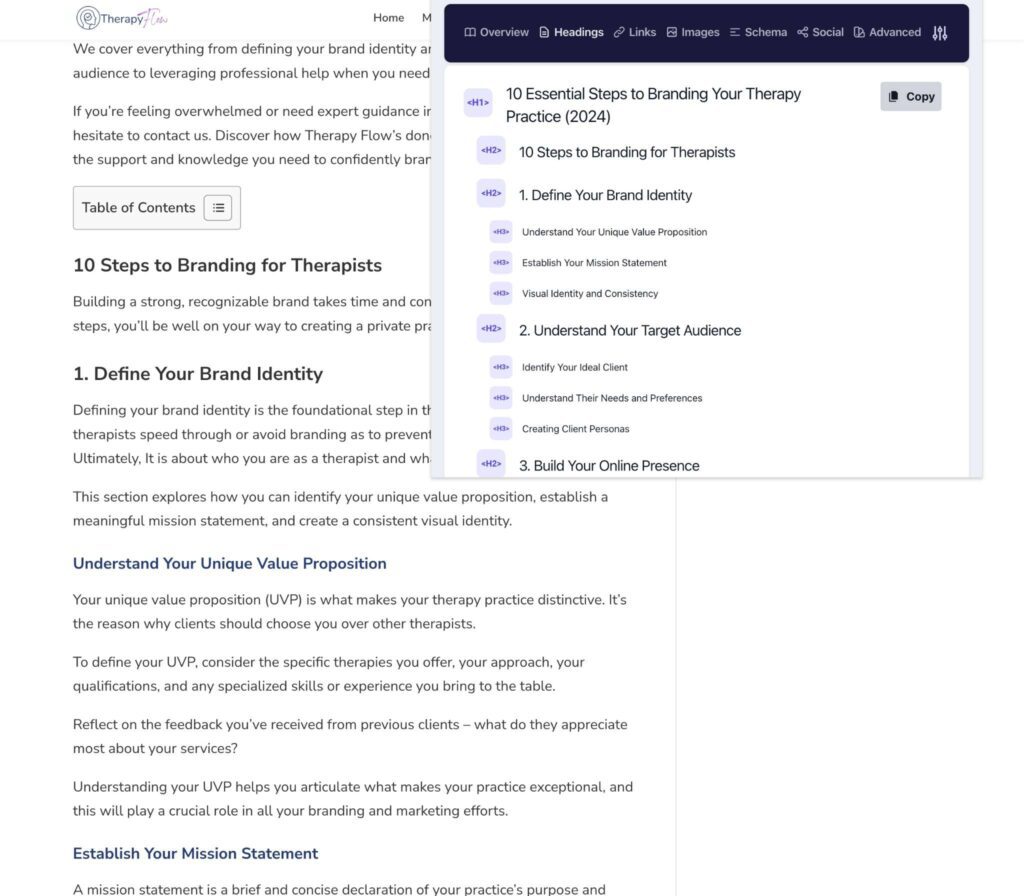
One of my favorite tools to check this is the free Ahrefs SEO Toolbar Chrome extension. It’s super easy to use. Once you add it to Chrome, you can scan your own site (or even other people’s sites, which is how I quickly audit potential clients’ websites).
It will show you:
- Your page titles and meta descriptions (and if any are missing)
- Whether you have more than one H1 on a page
- The full structural order of your header tags
Pause reading this and download it now — seriously. Open your homepage and you’ll immediately see if your headers are neat and readable like a well-written book, or chaotic with multiple H1s and missing meta descriptions (that’s a “fix me” situation).
And if you want to make sure you’re doing it right, I’ve got a full guide on Header Hierarchy in Showit to walk you through the exact steps.
3. Refresh Your Page Titles and Meta Descriptions
Think of this as updating your business card for Google. Page titles and meta descriptions are the first thing people (and search engines) see — so you want them to actually reflect what you do right now, not three offers ago.
Go through your main pages — Home, About, Services, Portfolio, and your top blog posts — and make sure:
- Every page has a unique page title and meta description. Nothing should be duplicated.
- They reflect your current offerings and direction. Don’t leave in a service you’re no longer doing — that just confuses visitors (and Google).
- They align with your goals for the upcoming year. If you’re planning new services, pricing changes, or a fresh direction, update these to match.
Free tools like Ubersuggest, AnswerThePublic, or even your own Google Search Console can help you see what people are searching for and how they’re finding your site. Use that info to refine your titles, meta descriptions, and even headers from the previous section.
Here are some quick tips to make them work:
- Page titles: Keep them under 60 characters so they don’t get cut off in search results.
- Meta descriptions: Aim for 120–150 characters — this is the text that appears under your page title in Google. Make it enticing, clear, and relevant.
If your current titles are something like “Home — My Site” or “Home — unicaforma.com,” yeah… that’s terrible. Fix it. You can even use an AI tool to help craft them: give it your H1, your page goals, and your brand voice, and it can spit out some solid drafts for you.
Doing this now sets you up for a more strategic year. It ensures your pages actually communicate what you offer, reflect your current goals, and give Google the right info to show your site to the right people. Bonus: it also helps guide ideas for new blog posts in the year ahead.
4. Audit Your Website Speed
Slow sites frustrate users and kill your SEO. Period. I’m serious — slow sites are going to turn users away faster than you revealing your political party. Think about the last time you visited a website. Did you stick around to wait for it to load, or did you immediately hit the back button and find another resource? Yeah… your visitors are doing the exact same thing to your site, no matter how badly they want to see your content.
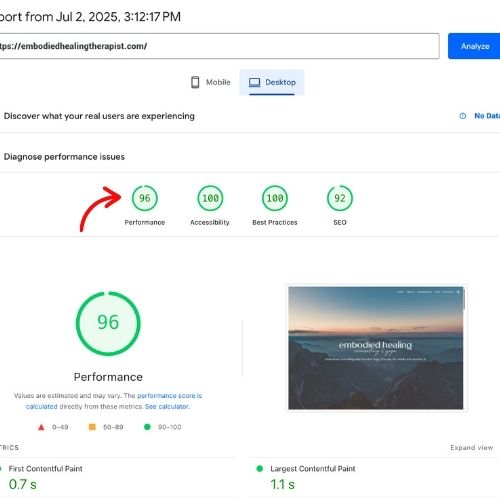
A website audit isn’t complete without checking your site speed. You can run your website through Google PageSpeed Insights for free and check both desktop and mobile scores. It’ll tell you all the details: what’s slowing your site down, where the bottlenecks are, and how to fix them.
Here’s the benchmark you want:
- Desktop: under 3 seconds load time (aim for green in performance)
- Mobile: under 4 seconds load time (green is great, yellow is fine, red is a no-go)
If your site is lagging, start with the biggest offenders: images and videos. Compress them. Remove any unnecessary plugins. Maybe even reconsider your hosting plan if it’s slowing things down. I’ve written a full Image Optimization post that walks you through how to optimize your images on ShowIt — but the principles apply to any platform.
Desktop should basically always hit green. Mobile might never get perfect, but never, ever let it be red. If your score is in the red zone, fix it — fast. Your mobile visitors are already bouncing if your site isn’t loading efficiently.
Running this simple audit on your website speed is one of the easiest ways to improve user experience, keep people engaged, and give Google the performance signals it wants. Don’t skip it.
5. Test Mobile Friendliness
Here’s the deal: mobile dominates. Over 60% of web traffic now comes from smartphones, and honestly, think about your own browsing habits — how often are you on your phone versus your computer? Even as a web designer who spends all day on my laptop, I’m constantly checking websites on my phone.
A website that looks janky on mobile is a credibility killer. Some platforms auto-generate mobile versions of sites (looking at you, non-ShowIt platforms 😅), and things get weird fast: images stretch, paragraphs break into odd sections, buttons are tiny, and suddenly your beautiful desktop design is unusable on mobile. That’s why I love ShowIt — it gives you full control over mobile layouts. But even then, you still need to check.
When you’re auditing your website for mobile friendliness, grab your phone (and maybe a friend or family member’s device too) and run through these checks:
- Buttons: Big enough to tap without zooming?
- Text: Readable without pinching and zooming? Yes, 12pt might look nice on a desktop, but on mobile, 16pt+ is where you want to be for readability and accessibility.
- Images & Sections: Are they aligned correctly, not stretched, and visually balanced?
If your site doesn’t function well on mobile, people will close out and move on — no matter how amazing your content or offers are. Mobile is not optional in 2025 going into 2026. Make sure your site works beautifully everywhere.
6. Check Google Search Console + Analytics
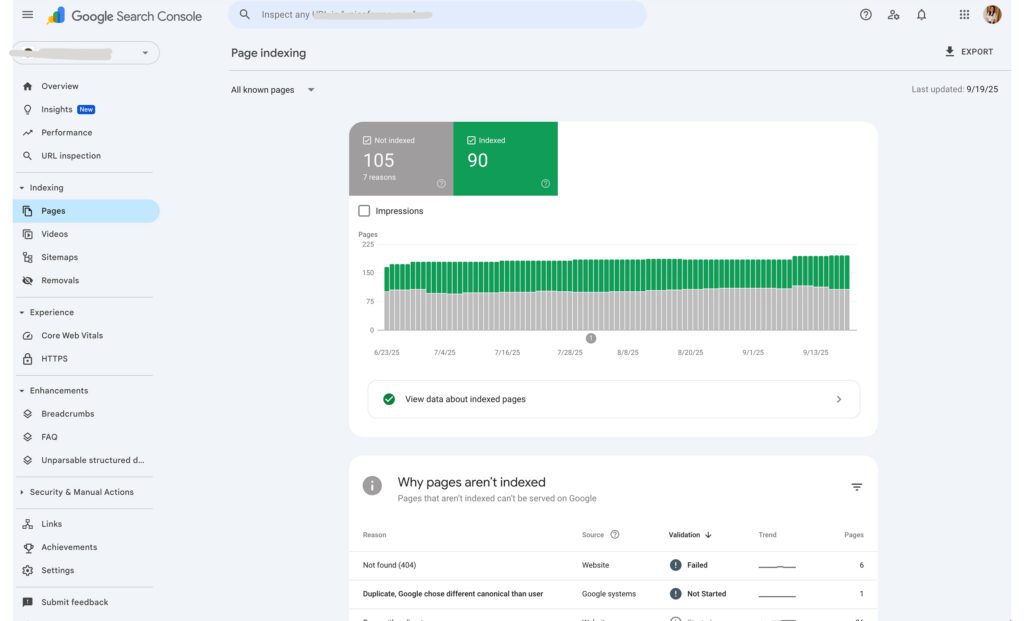
If you haven’t set up Google Analytics and Google Search Console, stop reading this blog, open a new tab, and get them installed. Seriously — no foundation, no data, no clue what’s actually happening on your site. This is website audit 101. You can’t improve what you can’t measure.
Once you’ve got them set up, log in and start auditing your website:
- Google Analytics: See how many people are actually visiting your site, where they’re coming from, and which pages are performing best. This is your traffic snapshot.
- Google Search Console: See how Google is indexing your pages, check for coverage errors or manual actions, and understand which keywords are bringing people to your site (and which ones you should focus on in the year ahead).
You can also layer in heatmaps and scroll maps (tools like Hotjar or Microsoft Clarity) to see how users interact with your site: where they’re clicking, how far they’re scrolling, and which sections they skip. This helps you make data-driven decisions — maybe your amazing offer is buried too far down, or your call-to-action isn’t catching eyes.
Having these tools isn’t optional — it’s foundational. Without them, you’re flying blind. If you need a hand getting set up, I’ve got full guides here:
Auditing your website using these tools gives you real insight into what’s working, what’s not, and where to focus your efforts to make 2026 your most optimized year yet.
7. Audit Your Website’s Backlinks
Backlinks are basically references for Google — websites linking to yours signal that your site is credible and trustworthy. But here’s the catch: not all backlinks are created equal. Some links come from shady spam sites, link farms, or completely unrelated niches. These are called toxic backlinks, and too many of them can hurt your SEO instead of helping it.
As part of your website audit, you want to check your backlinks at least once or twice a year (quarterly if you’re getting a lot of them). In Google Search Console, go to Links → Top Linking Sites to see who’s linking to you. Look for anything spammy or irrelevant — think sketchy casinos, random blogs in unrelated industries, or sites that feel sketchy.
If you find toxic links, you can disavow them to prevent Google from counting them against your site. Tools like Ahrefs or SEMRush make this process easier — you can run a toxic backlink report even on a free trial. Just be careful: not every link that isn’t helping your SEO is “toxic,” so only disavow the truly harmful ones.
While you’re auditing your website for backlinks, also consider a strategy to build quality backlinks this year. These could include:
- Guest appearances on relevant podcasts
- Blog swaps or collaborations with other sites in your industry
- Getting featured in awards, roundups, or media mentions
Quality backlinks improve your domain authority, help Google recognize your site as credible, and ultimately boost your search rankings. Checking and cleaning up your backlinks is a small effort that pays off in credibility and SEO — and planning a few quality link-building moves can set you up for a strong year ahead.
8. Review Navigation + Design Consistency
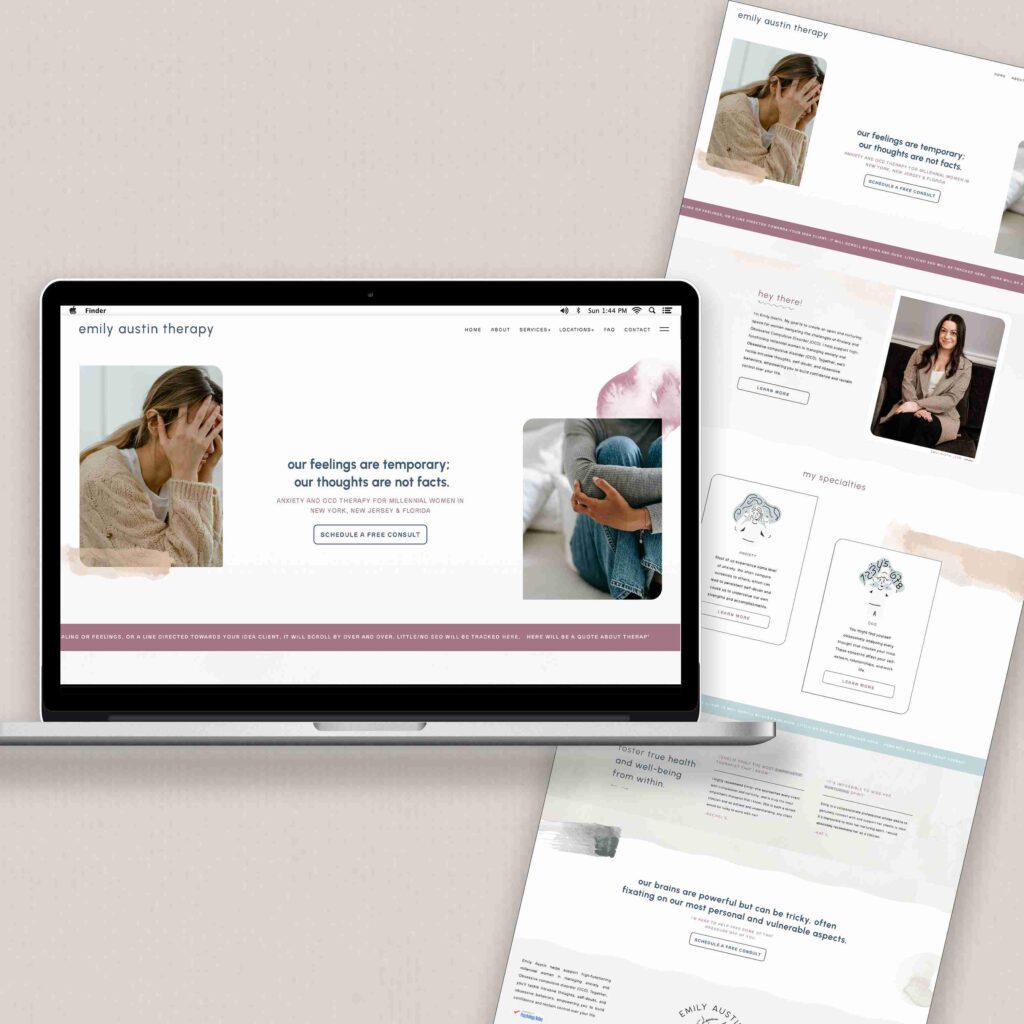
One thing that tends to get messy over the course of a year is your site’s design and navigation. Maybe you added a new page, launched a program, or dropped in a free webinar. Even if nothing is technically broken, small inconsistencies can creep in: fonts look different, buttons aren’t the same size, imagery feels off, or links take users to the wrong place.
As part of your website audit, go through your site like a first-time visitor. Ask yourself:
- Can I find everything easily?
- Do buttons, fonts, and images feel consistent?
- Are there elements that look outdated or out of place?
- Are all clickable things actually easy to click?
It can also be helpful to grab a friend or family member who doesn’t use your site regularly — someone brutally honest — and watch them navigate. Are they easily able to contact you, book a service, or find your main offerings? If not, you need to tighten things up.
Your goal is simple: make it as easy as humanly possible for people to take action. Buttons should basically be shouting, “Click me! Book this! Sign up!” throughout the site. Scattered design = scattered brand. Your website deserves better, and you’re better than that.
9. Audit Your Website for Accessibility
Website accessibility is all about making your site usable for everyone, including people with visual impairments, motor challenges, or other disabilities. But it’s not just about compliance — it’s about good design. A well-accessible site is easier for humans to navigate and for search engines (and AI tools) to understand your content.
A simple way to check your site is using the WAVE Accessibility Checker. Run your site through it and make sure:
- Every image has alt text — this describes images for screen readers and Google bots.
- Text contrasts are readable — high contrast helps people with vision challenges read easily.
- Forms and buttons are labeled correctly — so users know what each field or button does.
- The site is keyboard-navigable — all interactive elements should be accessible without a mouse.
Accessibility isn’t just a “nice-to-have.” It improves user experience, strengthens your SEO, and ensures your content is discoverable by people and bots alike. Clear headings, descriptive alt text, and proper labeling make it easier for search engines to crawl your site and understand what each page is about. Bonus: as AI-driven tools increasingly parse websites, accessible structure and clear labeling only make your content more readable and usable in those contexts too.
In short: accessible websites = better design + better rankings + happier visitors. Win-win-win.
10. Review Your Copy
It’s time to audit your website’s copy and calls to action. Pull up each page and read through it like a visitor who’s never seen your site before. Ask yourself:
- Does it sound like you today, not you from two years ago?
- Are your headlines still attention-grabbing?
- Do your services and pricing reflect what you actually offer now?
- Are your calls to action clear, strategic, and irresistible?
Your audience may have shifted since you launched your site. Who you were serving in 2023 might not be the same people you’re looking to work with in 2026. Make sure every piece of copy is speaking directly to your ideal client, reflects your offerings, and motivates the action you want them to take.
Zhuzh up what you’ve got: rework a few sections, update logistical info, clarify pricing, or tweak headlines. You don’t need to hire a fancy copywriter or fork over an arm and a leg to do this — you can audit your website yourself and make real improvements. Ask a friend or family member to give honest feedback: does it make sense, sound like you, and resonate with your audience?
Finally, remember your keywords. Pull in insights from your earlier audit on headers and page titles. Make sure your copy is optimized, readable, and speaks to both humans and search engines. By the time you finish this section of the audit, your website should be clear, compelling, and ready to convert in 2026.
✅ Your Quick Website Audit Checklist
| ✅ | Task | Tool / Resource |
|---|---|---|
| ☐ | Check for broken links | brokenlinkcheck.com |
| ☐ | Review header hierarchy | Ahrefs SEO Toolbar |
| ☐ | Refresh titles + meta descriptions | Ubersuggest, AnswerThePublic |
| ☐ | Test site speed | Google PageSpeed Insights |
| ☐ | Test mobile friendliness | Ask friends and family |
| ☐ | Check analytics + search console | Set up Google Analytics, Set up Search Console |
| ☐ | Review backlinks | Search Console → Links |
| ☐ | Review navigation + design | — |
| ☐ | Audit accessibility | WAVE Accessibility Checker |
| ☐ | Refresh copy + CTAs | — |
| ☐ | Track user behavior | Hotjar, Microsoft Clarity |
Wrap-Up + Next Steps
I know, I know — that was a lot. But hear me out: most of the tools I mentioned are free, and running through this audit doesn’t take forever. Depending on your site, you can probably knock it out in two hours or less.
The point is simple: by checking your site and dotting all your I’s and crossing your T’s, you’re setting yourself up for a website that runs faster, ranks better, and gives visitors a smoother experience — which hopefully translates to more leads, clients, and happy human interactions 👏👏👏.
So grab a coffee (iced, hot, whatever you love), cozy up, and book out an afternoon to get this done. Your “future you” — the one with a thriving, high-converting, fully-optimized website — will thank you.
If doing this yourself sounds overwhelming or you just don’t have the time, that’s exactly what I offer with my VIP Day. Book a free discovery call, and I’ll walk through your site, flag what’s working and what isn’t, and make a plan to tackle your full audit. Less stress, more results, and done right the first time.
Frequently Asked Questions
What is a website audit and why is it important?
A website audit is basically a full check-up on your site — broken links, headers, SEO, mobile-friendliness, accessibility, design consistency, copy, and more. Doing this ensures your website is actually working for you instead of holding you back. Think of it like giving your website the TLC it deserves before the year kicks off. It helps with SEO, conversions, and making sure visitors don’t bounce because something’s broken or confusing.
How long does a website audit take?
Honestly? If you’re just checking things and taking notes, you can do a full audit in about 1–2 hours depending on the size of your site. Fixing issues obviously takes longer, but the good news is a lot of the tools I mentioned are free and super straightforward. You can get through the “spotting problems” part fast and then prioritize fixes from there.
Do I need technical skills to audit my website?
Nope. Most of the tools I recommend are plug-and-play. BrokenLinkChecker shows you dead links, the WAVE Accessibility Checker flags accessibility issues, Google PageSpeed Insights tells you what’s slowing down your site, and the Ahrefs Chrome extension gives you a snapshot of headers and meta info. You don’t need to know code — just a little patience and attention to detail.
How often should I audit my website?
At a minimum, once or twice a year. Quarterly is ideal if your site changes frequently or you’re adding a lot of new content, services, or pages. Regular audits keep your website clean, fast, and user-friendly — and prevent SEO issues from creeping in over time.
Can a website audit improve my SEO and conversions?
Absolutely. A website that’s fast, mobile-friendly, accessible, well-structured, and clear signals to Google that you’re credible, which helps with rankings. Plus, a smooth user experience keeps people on your site longer and nudges them toward your calls-to-action, which means more leads, more clients, and fewer visitors bouncing off. It’s basically a win-win.
Pin for later:

Jordin Brinn is the founder and lead designer of Unica Formo — a creative studio in Columbus, Ohio, specializing in custom Showit website design and brand strategy for service-based businesses like coaches, consultants, therapists, creatives, and wellness professionals. With over a decade of business experience, she helps clients bring strategy, clarity, and personality to their online presence.
Explore design services and free resources at unicaformo.com.


