

UNICA
FORMO
Branding + website design studio

Follow Along:


With clients featured in:







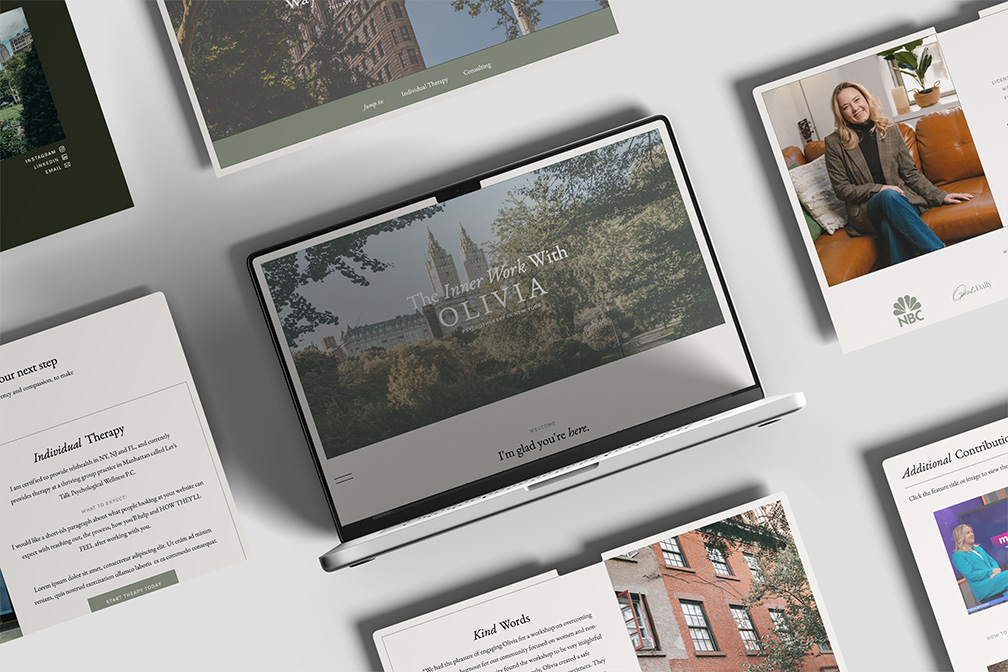
Designed for Therapists Who Want to Make the First Step Easier
Starting therapy can be a big step. Before someone ever fills out your contact form, they may be trying to figure out whether you work with people like them, whether you’re in the right location, what therapy with you actually looks like, and whether they’ll feel comfortable talking to you.
Your brand and website should help answer those questions before they ever have to ask. I help you create digital experiences that reflect who you are as a therapist and give potential clients a sense of your practice, your personality, and what it might feel like to work with you.
Whether your practice feels warm and calming, playful and energetic, or somewhere in between, I build around your personality while keeping the person on the other side of the screen at the center of the experience.


A Client-Led Approach to Therapy Brands & Websites
I also build SEO into the structure from the beginning, helping the right people find you based on what they're searching for, where you're licensed to practice, and the specific support they need. The goal is to give potential clients enough clarity and confidence to take the next step without making them do all the work first.
Experience Designing for Therapists
I’ve worked with dozens and dozens of therapists to create brands and websites that feel specific to the person behind the practice. I know how important it is to move beyond the generic look and language often associated with therapy websites and create something that reflects your personality, your approach, and the people you want to work with.
I also understand that potential clients often have plenty of therapists to choose from. Your website needs to help them understand what makes your practice different, what it might feel like to work with you, and why they can trust you with something as personal as starting therapy.

Your brand sets the tone before a potential client ever meets you. I’ll create a visual identity that reflects your personality, practice, and the people you serve, from your logo, typography, and color palette to imagery, patterns, icons, and the details that make your practice feel like yours.
Brand Direction
Strategic Website Structure
Showit Website Design
Your website should answer the questions someone has before they're ready to reach out. I’ll structure your site around your specialties, location, services, process, FAQs, and the information clients need to understand what working with you actually looks like, while building SEO foundations into the structure from the start.
Brand Direction
Strategic Website Structure
Showit Website Design
This is where your brand, strategy, and client experience come together. I’ll create a Showit website that feels like an extension of your practice, explains what you do in language your clients understand, and guides them from that first moment of uncertainty toward feeling comfortable taking the next step.
Brand Direction
Strategic Website Structure
Showit Website Design
testimonials
"The custom Brand Book she created for my practice was transformative. It helped me clarify answers to questions I didn’t even know how to articulate. —I’m so grateful for her expertise, patience, and vision. Working with Unica Formo was one of the best investments I made in my practice.
-Elvan, Owner of Mindful Conversations Therapy
01/04
Next


real stories
real results
"She understood my vision, she was so detail-oriented, beyond responsive and quick with her edits and feedback, and I am obsessed with her work. Now, I have a website and a cohesive brand that I'm so proud of. Through Jordin's understanding of search engine optimization, I have so many more views and inquiries coming through my website."
-Emily, Emily Austin Therapy

"Reaching out to Jordin to revamp my self-made website was hands down the best decision that I have made for marketing my business. She is organized, prompt with communication, and super open to feedback. Every time I've worked with her, I see a definitive response in terms of referrals and website visitors... 10 out of 10 recommend every time."
-Kristen, Embodied Healing Counseling + Yoga
Helpful Resources for Therapists
Building a website that connects with the right clients takes more than a beautiful design. These resources cover the strategy behind creating a stronger online presence for your therapy practice, from SEO and blogging to Google visibility, website structure, and Showit tips.
For therapists +
All About Google, SEO and Blogging +
All things Showit +
Private Practice Blog: Do You Really Need One for Your Therapy Website?
9 Best Therapist Websites That Actually Connect With Clients
Showit Websites for Therapists: What Works (And What Doesn’t)
Therapist Website SEO Best Practices: How to Rank Higher and Attract More Clients
Social Media for Therapists: How to Show Up Without Stress
For therapists +
All About Google, SEO and Blogging +
All things Showit +
How I Use AI to Write Every Single Blog Post (Without Tanking My SEO)
How to Blog for SEO (So Google Actually Ranks Your Content)
How to Monetize Your Blog with Better Website UX
How to Optimize Your Google Business Profile
How to set up Google Search Console and submit your Sitemap
How to Set Up Google Analytics (and Add It to Your Showit Site)
Header Hierarchy in Showit: How to Use Text Tags for SEO
For therapists +
All About Google, SEO and Blogging +
All things Showit +
What Is Showit? (Everything You Need to Know)
Best Places to Find Custom CSS for Showit Designers
DNS Transfer to Showit: How to Switch Without the Headache
Showit vs. Squarespace, Wix, and WordPress: Why Showit is the Best Website Platform for Your Business
How To Add Your Showit Template Key To Your Website
How to Add a Search Bar to Showit (Beginner Friendly)
The Ultimate Guide to Optimize Images for Showit
How to Customize a Showit Template Without Breaking It
Ultimate Guide to Custom Showit Website Design (2026)
How to Set Up Redirects on Showit
What Makes a Showit Website Different? (And Why I Recommend It)
6 Reasons Your Showit Website Template Isn’t Converting
For therapists -
All About Google, SEO and Blogging +
All things Showit +
Private Practice Blog: Do You Really Need One for Your Therapy Website?
9 Best Therapist Websites That Actually Connect With Clients
Showit Websites for Therapists: What Works (And What Doesn’t)
Therapist Website SEO Best Practices: How to Rank Higher and Attract More Clients
Social Media for Therapists: How to Show Up Without Stress
For therapists +
All About Google, SEO and Blogging -
All things Showit +
How I Use AI to Write Every Single Blog Post (Without Tanking My SEO)
How to Blog for SEO (So Google Actually Ranks Your Content)
How to Monetize Your Blog with Better Website UX
How to Optimize Your Google Business Profile
How to set up Google Search Console and submit your Sitemap
How to Set Up Google Analytics (and Add It to Your Showit Site)
Header Hierarchy in Showit: How to Use Text Tags for SEO
For therapists +
All About Google, SEO and Blogging +
All things Showit -
What Is Showit? (Everything You Need to Know)
Best Places to Find Custom CSS for Showit Designers
DNS Transfer to Showit: How to Switch Without the Headache
Showit vs. Squarespace, Wix, and WordPress: Why Showit is the Best Website Platform for Your Business
How To Add Your Showit Template Key To Your Website
How to Add a Search Bar to Showit (Beginner Friendly)
The Ultimate Guide to Optimize Images for Showit
How to Customize a Showit Template Without Breaking It
Ultimate Guide to Custom Showit Website Design (2026)
How to Set Up Redirects on Showit
What Makes a Showit Website Different? (And Why I Recommend It)
6 Reasons Your Showit Website Template Isn’t Converting

